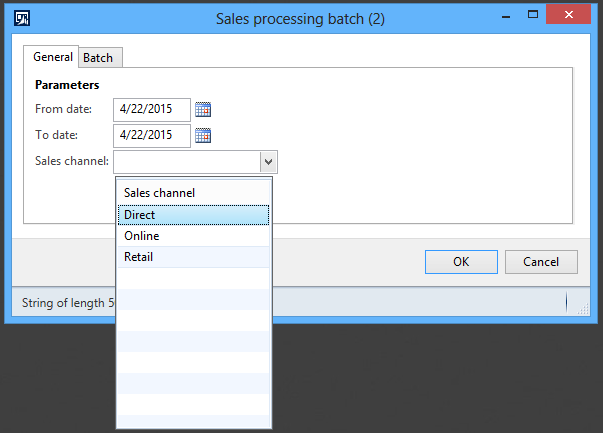
Prerequisites:
1. Create a simple batch job.
2. Add fields to batch job dialog.
Business Requirement:
To have a lookup on the batch job dialog to filter records to be processed based on the user selected value of sales channel field on the dialog.
Project Overview:

We’ll be adding a new UI Builder class MAKSalesTableUIBuilder and link it with the MAKSalesTableContract class to add lookup on the batch dialog. It is highly recommended to read the prerequisites first before proceeding any further to have better understanding of the topic.
Development steps:
1. Add salesChannel variable to the class declaration of MAKSalesTableContract class to store sales channel value:
[DataContractAttribute]
class MAKSalesTableContract
{
    TransDate           fromDate;
    TransDate           toDate;
    MAKSalesChannel     salesChannel;
}
2. Add parm method for sales channel variable to designate it as a data member of the contract class:
[
    DataMemberAttribute,
    SysOperationLabelAttribute(literalStr("Sales channel")),
    SysOperationHelpTextAttribute(literalStr("Pick sales channel")),
    SysOperationDisplayOrderAttribute('3')
]
public MAKSalesChannel parmSalesChannel(MAKSalesChannel _salesChannel = salesChannel)
{
    salesChannel = _salesChannel;

    return salesChannel;
}
3. Compile and generate incremental CIL.
4. Click Tools > Caches > Refresh elements to refresh the AOD cache to reflect changes on the batch dialog.
5. You should be able to see newly added Sales channel field on the batch dialog but without a lookup.

6. Create a new class MAKSalesTableUIBuilder which extends SysOperationAutomaticUIBuilder base class:
class MAKSalesTableUIBuilder extends SysOperationAutomaticUIBuilder
{
    #define.lookupAlways(2)

    DialogField     fromDateField;
    DialogField     toDateField;
    DialogField     salesChannelField;
}
7. Override the postBuild method of the base class to get the references to dialog field controls after creation:
public void postBuild()
{
    super();

    //Get references to dialog controls after creation
    fromDateField = this.bindInfo().getDialogField(
        this.dataContractObject(), methodStr(MAKSalesTableContract, parmFromDate));

    toDateField = this.bindInfo().getDialogField(
        this.dataContractObject(), methodStr(MAKSalesTableContract, parmToDate));

    salesChannelField = this.bindInfo().getDialogField(
        this.dataContractObject(), methodStr(MAKSalesTableContract, parmSalesChannel));

    //Change text field metadata to add lookup
    salesChannelField.lookupButton(#lookupAlways);
}
8. Override the postRun method of the base class to register the custom lookup method salesChannelFieldLookup with the form control event lookup:
public void postRun()
{
    super();

    //Register overrides for form control events
    salesChannelField.registerOverrideMethod(
        methodstr(FormStringControl, lookup),
        methodstr(MAKSalesTableUIBuilder, salesChannelFieldLookup),
        this);
}
9. Give the following implementation for the custom lookup method salesChannelFieldLookup:
public void salesChannelFieldLookup(FormStringControl _control)
{
    Query                   query;
    QueryBuildDataSource    qbdsMAKSalesTable;
    SysTableLookup          sysTableLookup;

    query = new Query();
    qbdsMAKSalesTable = query.addDataSource(tableNum(MAKSalesTable));
    qbdsMAKSalesTable.fields().clearFieldList();
    qbdsMAKSalesTable.fields().addField(fieldNum(MAKSalesTable, SalesChannel));
    qbdsMAKSalesTable.addGroupByField(fieldNum(MAKSalesTable, SalesChannel));

    sysTableLookup = SysTableLookup::newParameters(tableNum(MAKSalesTable), _control);
    sysTableLookup.addLookupfield(fieldNum(MAKSalesTable, SalesChannel));
    sysTableLookup.parmQuery(query);
    sysTableLookup.performFormLookup();
}
10. Lastly, modify the class declaration of MAKSalesTableContract class to link it with the MAKSalesTableUIBuilder class we just created by decorating it with the SysOperationContractProcessingAttribute:
[
    DataContractAttribute,
    SysOperationContractProcessingAttribute(classStr(MAKSalesTableUIBuilder))
]
class MAKSalesTableContract
{
    TransDate           fromDate;
    TransDate           toDate;
    MAKSalesChannel     salesChannel;
}
11. Compile and generate incremental CIL.
12. Click Tools > Caches > Refresh elements to refresh the AOD cache to reflect changes on the batch dialog.
13. Click on the menu item MAKSalesTableService to run the batch job dialog.
14. You should now be getting a lookup generated for the Sales channel field on the batch dialog 🙂

Next:
Next in the series: Customize controller for batch job.
 D365 for Finance and Operations
Thank you for sharing the logic Anas.I have a question.
If i want to add lookup for another field then do i have to create a new UIBuilder class or should i write the logic in the same MAKSalesTableUIBuilder class.
Hi Santosh,
You must do the following:
1. Add new data member in MAKSalesTableContract class if not already added.
2. Add new dialog field in MAKSalesTableUIBuilder class for the new data member on the dialog.
3. Register overridden method for the dialog field in the postRun method of MAKSalesTableUIBuilder class.
This should meet your requirement. Let me know if you want something else. Thanks!