
We recently encountered an issue while working on bank reconciliation worksheet on the service update 10.0.41. After raising it with Microsoft, it was advised that we can resolve it by disabling a flight and turning off a parameter in Cash and bank management module.
Application:
Dynamics 365 for Finance and Operations
Error:
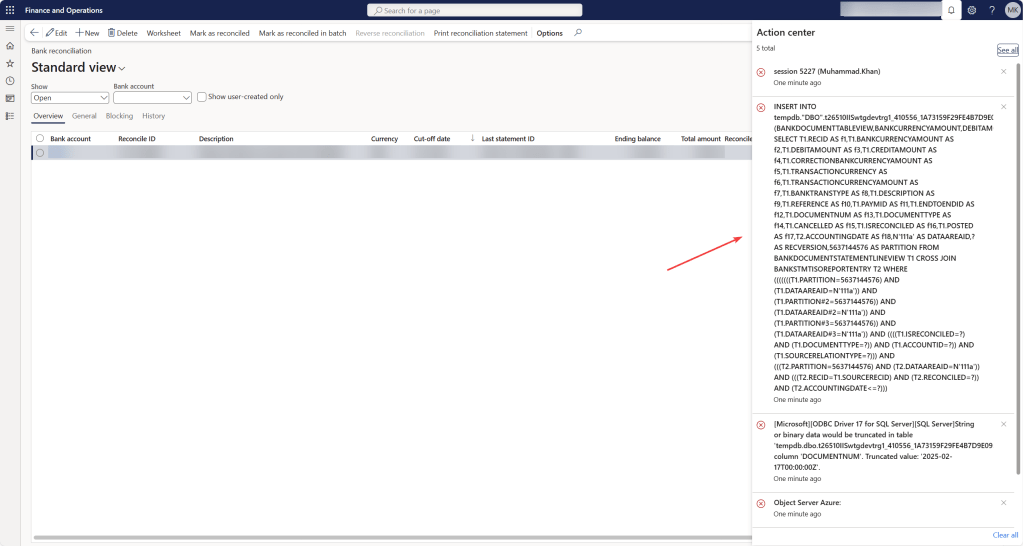
User gets errors while clicking on the Worksheet button on a bank reconciliation.
Insert into tempdb.”DBO”…
String or binary data would be truncated in table…
Solution:
To resolve this issue, the following flight must be disabled in the specified environment.
- For Tier-1 environments: The flight can be disabled by executing a SQL query.
- For Sandbox or Production environments: A request must be raised with Microsoft to disable the flight, as direct database modifications are not permitted in these environments.
RemoveLoadReconciliationWorksheetExtensibleFlight
Tier-1
Please run the following SQL query to disable the flight.
insert into dbo.SYSFLIGHTING(FLIGHTNAME, ENABLED, FLIGHTSERVICEID) values ('RemoveLoadReconciliationWorksheetExtensibleFlight_KillSwitch', 1, 12719367)
Once the flight is disabled, the following parameter will start appearing in the Cash and bank management parameters form. Toggle to Yes.
The bank reconciliation worksheet issue should be resolved now. Users should be able to click on the Worksheet button to view the worksheet.
Turn off reconciliation performance enhancements

 D365 for Finance and Operations
Leave a comment