Purpose: Install the latest version of an ISV on DEV environment Application: Dynamics 365 for Finance and Operations Business requirement: Upgrade ISV to get the latest and greatest features in the product Solution: Delete Open Visual Studio Stop all the relevant services Make sure there are no pending changes Delete package(s) from source control explorer... Continue Reading →
The database could not be exclusively locked to perform the operation
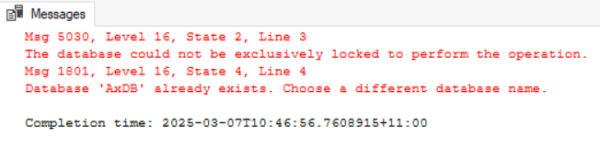
The previous script for renaming a database in a Tier-1 cloud environment resulted in an error due to exclusive locking issues. The recommended solution involves setting the database to single-user mode, renaming it, and then reverting to multi-user mode before renaming the new database to the desired name.
Bank reconciliation worksheet errors on 10.0.41

A bank reconciliation worksheet issue was identified in Dynamics 365 for Finance and Operations after update 10.0.41, causing errors during worksheet access. Microsoft recommended disabling a specific flight and modifying a parameter in the Cash and bank management module to fix it. The solution varies for Tier-1 and production environments.
D365: How to get caller form name in Event Handler class
This post explains how to retrieve the caller form name in an event handler class in Dynamics 365 for Finance and Operations. It addresses the business requirement of adding a query range based on the caller form. The provided X++ code demonstrates how to implement the OnInitialized event handler for a form datasource.
D365: When and how to use mapEntityToDatasource() method
This method, mapEntityToDataSource(), is used in Dynamics 365 for Finance and Operations to initialize datasource fields or create datasource table records while importing data. It checks for existing records and initializes fields based on specific conditions. Understanding data entities and management is essential for utilizing this method effectively.
D365: Integrate with Azure File Share
This post demonstrates how to read and write text files to Azure File Share using C# code. The solution includes using the ATLAS_AzureFileShareService class in Dynamics 365 for Finance and Operations to connect with Azure File Share. Methods for getting, moving, and uploading files are provided within the code.
D365: Refresh entity list batch job failing

Summary: Encountered error in DEV box during Refresh Entity List batch job after modifying data entity in Dynamics 365 for Finance and Operations. Error message indicates lack of change tracking in SQL database. Solution involves enabling change tracking with a specific SQL command on the database.
D365: Get worker email address by purpose in X++
This content demonstrates how to obtain a worker's email address based on a specific purpose, such as "Purchase Order," within Dynamics 365 for Finance and Operations. It includes a solution involving an extension class of the HcmWorker table to achieve this, using a provided code example for reference. The method can be called to initialize a temporary table buffer.
D365: Get dimension value owner name in X++
This X++ code demonstrates how to retrieve the owner name of a dimension value in Dynamics 365 for Finance and Operations. The business requirement is to show the cost center owner name in a report. By using the provided code, the cost center dimension value owner can be obtained and used to initialize the temp table buffer.
D365: Download multiple files in X++
This content provides a solution for downloading multiple files in X++ for Dynamics 365 for Finance and Operations. The class "ATLAS_Vend_File_Export" demonstrates the code to achieve this by using the "SendStringAsFileToUserNewTab" method. This helps meet the business requirement of allowing users to download multiple files within a single browser session.
 D365 for Finance and Operations