To filter data entity using an enum field, we need to use a specific query expression syntax. For example, to filter Purchase order header data entity, PurchaseOrderHeadersV2, to get only 'Confirmed' purchase orders, we can add filter to DocumentApprovalStatus entity field which sources its value from VersioningDocumentState enum like below: https://usnconeboxax1aos.cloud.onebox.dynamics.com/data/PurchaseOrderHeadersV2?$filter=DocumentApprovalStatus eq Microsoft.Dynamics.DataEntities.VersioningDocumentState'Confirmed' As you... Continue Reading →
AX7/D365/Operations: Create customer postal address through data entity from .NET console application
Purpose: The purpose of this document is to demonstrate how we can create customer postal addresses in Dynamics 365 for Finance and Operations using an external .NET console application. Code: static void Main(string[] args) { Program program = new Program(); Uri oDataUri = new Uri(ODataEntityPath, UriKind.Absolute); var context = new Resources(oDataUri); context.SendingRequest2 += new EventHandler(delegate... Continue Reading →
AX7/D365/Operations: Enable/Disable form control in X++
Purpose: The purpose of this document is to demonstrate how we can enable/disable a form control in X++ based on a business logic. Product: Dynamics 365 for Finance and Operations, Platform Update 9. Development approach: Customization through extension. Development: Create a post event handler of a standard form method enabling/disabling the form controls. In this... Continue Reading →
AX7/D365/Operations: Create Details Master pattern form
Purpose: The purpose of this document is to demonstrate how we can develop a Details Master form in Dynamics 365 for Operations. While doing so, it also shows how to apply the new form patterns and subpatterns. Please note that the new Details Master pattern (Dynamics 365 for Operations) obsoletes the older ListPage pattern (AX... Continue Reading →
AX7/D365/Operations: Create custom data entity
Purpose: The purpose of this document is to demonstrate how we can develop a custom data entity for a custom table in Dynamics 365 for Operations. Prerequisites: Access to Dynamics 365 for Operations instance via remote desktop. To be provisioned as an administrator for the instance. Visual Studio project, model, package have been created. Custom... Continue Reading →
AX7/D365/Operations: Data import using data entities
Purpose: The purpose of this document is to demonstrate how we can import data using data entities in Dynamics 365 for Operations. Prerequisites: Access to Dynamics 365 for Operations instance via remote desktop. To be provisioned as an administrator for the instance. Business requirement: Ability to import/migrate legacy business data to Dynamics 365 for Operations.... Continue Reading →
AX7/D365/Operations: Create custom module
Purpose: The purpose of this document is to demonstrate how we can create custom module in the main menu for Dynamics 365 for Operations. Prerequisites: Access to Dynamics 365 for Operations instance via remote desktop. To be provisioned as an administrator for the instance. Visual Studio project, model, package have been created. Business requirement: Ability... Continue Reading →
AX7/D365/Operations: Data export using data entities
Purpose: The purpose of this document is to demonstrate how we can export data using out-of-band (OOB) data entities from Dynamics 365 for Operations. Prerequisites: Access to Dynamics 365 for Operations instance via remote desktop. To be provisioned as an administrator or at least data management officer for the instance. Business requirement: Ability to export... Continue Reading →
AX7/D365/Operations: Data entities export data error
Exception: While exporting data from local VM of Dynamics 365 for Operations, you might get an error if the Azure storage emulator is not running. Microsoft.WindowsAzure.Storage.StorageException: Unable to connect to the remote server —> System.Net.WebException: Unable to connect to the remote server —> System.Net.Sockets.SocketException: No connection could be made because the target machine actively refused... Continue Reading →
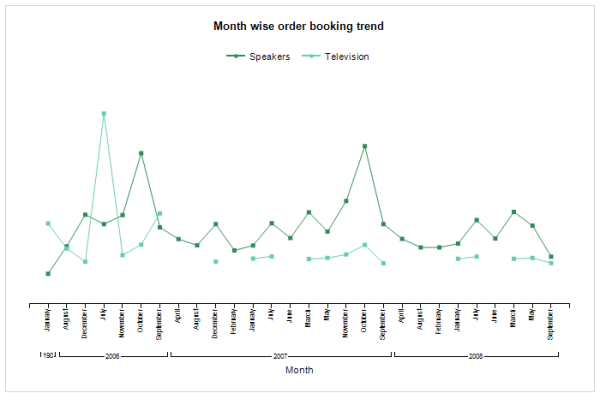
AX 2012: Create SSRS Line Chart Report
Purpose: The purpose of this document is to demonstrate how we can leverage the power of business intelligence through a simple SSRS line chart report. Prerequisites: Visual Studio 2013 Visual Studio 2013 tools. Reporting extension. Report Builder. Should be well-versed in Report Programming Model. Business requirement: Leverage business intelligence by analyzing sales trends for top item groups... Continue Reading →