You can quickly restart IIS express on a development environment of D365 Finance from within Visual Studio. This comes handy when you're doing development instead of restarting the service from LCS. You may already know but just to document, this is how you can restart a service from LCS.
D365 Finance: Bank reconciliation worksheet error
Purpose: The purpose of this blog post is to demonstrate how can we resolve the error which surfaces when user tries to open the worksheet for a bank reconciliation. Product: Dynamics 365 Finance Error message: When user tries to open worksheet for a given bank reconciliation record, he gets the following error message: Solution: Setting... Continue Reading →
Extensible data security policy for financial reports
Purpose: The purpose of this blog post is to demonstrate how we can achieve data filtration through Extensible Data Security (XDS) policies which cannot be achieved using Role-Based Security (RBS). Product: Dynamics 365 for Finance and Operations Disclaimer: This blog post uses Microsoft’s demo company data to demonstrate the concepts and processes and hence therefore... Continue Reading →
How to get Table Ids
Purpose: The purpose of this post is to demonstrate how we can get the table ids out of the development or production environment of Dynamics 365 for Finance and Operations. Product: Dynamics 365 for Finance and Operations Steps: In AX 2012, we used to find table ids from the properties window for a selected table... Continue Reading →
Budget control for purchase orders
Purpose: The purpose of this blog post is to demonstrate how can we configure budget controls for purchase orders. Product: Dynamics 365 for Finance and Operations Prerequisites: Basic understanding of main accounts and financial dimensionsBasic understanding of purchase orders, procurement categories, posting profile Disclaimer: This blog post uses Microsoft's demo company data to demonstrate the... Continue Reading →
Azure DevOps Workspaces Command
Purpose: The purpose of this blog is to demonstrate the use of Azure DevOps Workspaces command and how it can be executed using the Developer Command Prompt for V2015. Assumptions: Visual Studio 2015 version is being used. Steps: Sometimes you need to know the existing workspaces created for different users on different machines. The best... Continue Reading →
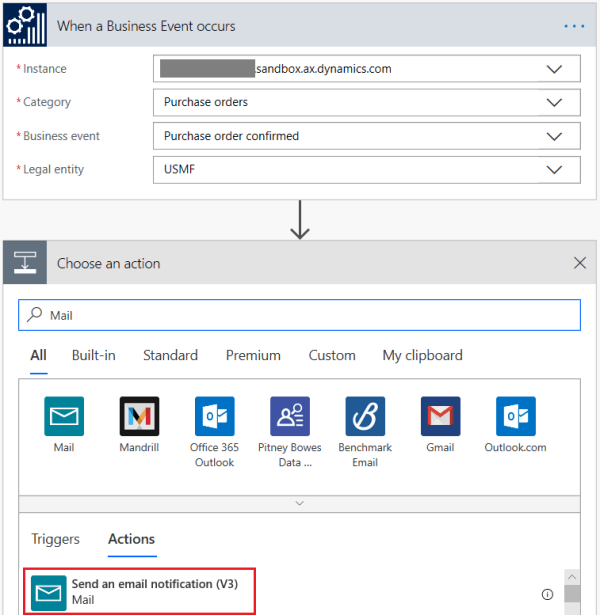
D365FO: Design Flow for Business Events in Dynamics 365 for Finance and Operations
Products: Dynamics 365 for Finance and Operations Microsoft Flow Azure messaging service Purpose: The purpose of this blog is to demonstrate how you can write Microsoft Flows to consume Business Events which are available in Dynamics 365 for Finance and Operations. Prerequisites: Basic understanding of Microsoft Flows Business events are activated in Dynamics 365 for... Continue Reading →
D365: Send email in X++ using email templates
Product: Dynamics 365 for Finance and Operations Purpose: The purpose of this document is to demonstrate how we can send emails in X++ using built-in email templates. For demonstration purposes we'll be using standard email template CnfmOrder. This email template is used to send email to customer when a sales order is confirmed. Business requirement:... Continue Reading →
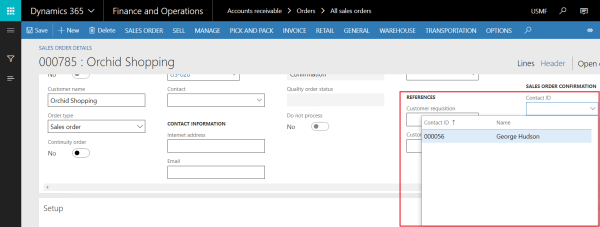
D365: Create lookup in X++
Product: Dynamics 365 for Finance and Operations Purpose: The purpose of this document is to demonstrate how we can create a lookup in X++ and attach it to an extension field added to the form extension of standard Sales order form. This is a good example to see how we can use event handling to... Continue Reading →
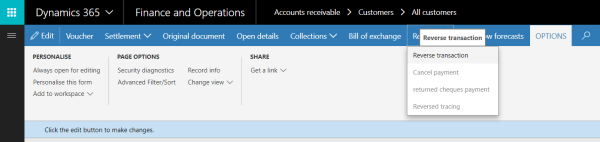
D365: Reverse customer transaction in X++
Purpose: The purpose of this document is to demonstrate how we can reverse a posted customer transaction through X++. The code below can be used as a script to automate reversal of posted customer transactions. Product: Dynamics 365 for Finance and Operations Development: Please find below the code which can be used to reverse a... Continue Reading →