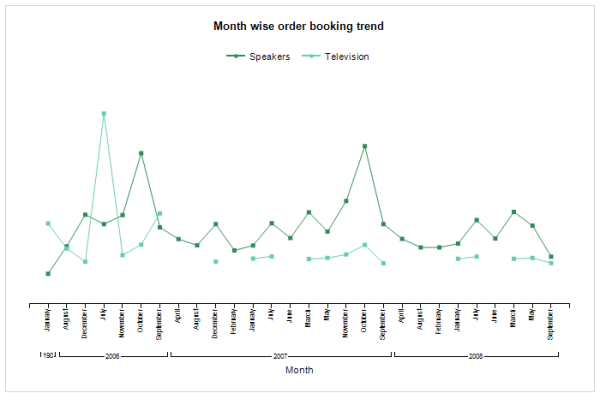
Purpose: The purpose of this document is to demonstrate how we can leverage the power of business intelligence through a simple SSRS line chart report. Prerequisites: Visual Studio 2013 Visual Studio 2013 tools. Reporting extension. Report Builder. Should be well-versed in Report Programming Model. Business requirement: Leverage business intelligence by analyzing sales trends for top item groups... Continue Reading →
AX 2012: Print SSRS Report in PDF to Disk
Purpose: The purpose of this document is to illustrate how we can print an SSRS report in PDF format to disk or file-system in X++. Business requirement: Ability to print an SSRS report in PDF format to disk or file-system automatically. Assumptions: SSRS report is successfully deployed to the report server. Development: Please find below the job... Continue Reading →
AX 2012: Create SSRS Column Chart Report
Purpose: The purpose of this document is to demonstrate how to develop SSRS column chart report in Dynamics AX 2012. Prerequisites: Visual Studio 2010 Visual Studio tools. Reporting extension. Report Builder. Should be well-versed in Report Programming Model. Business Requirement: Create a column chart report to show top products sold in the year 2012. Project... Continue Reading →
AX 2012: SSRS Report Drill Through Action URL
In this post we'll learn how to add a drill through action URL to a field in an SSRS report. The focus will be more towards exploring drill through action URL rather than developing SSRS report. We'll be using an RDP report with precision design to demonstrate the development. Let's say we have a requirement... Continue Reading →
AX 2012: Multi-Select Lookup for SSRS Report Dialog
Overview: In this post we'll learn how to build multi-select lookup for SSRS report dialog. We'll create an RDP report with an AutoDesign layout. Controller will be used to run the report. An output menu item will be created to point to the controller class. Each AOT element involved will be described in detail. You... Continue Reading →
AX 2012: Add Report Parameter to SSRS Query Report
In this post we'll learn how to add report parameter and show it in the report dialog for a Query based SSRS report. Please follow the development steps below to achieve it: 1. Create an AOT Query MAKCustTable. 2. Drag CustTable table to the Data Sources node of the query. 3. Set Dynamic property to... Continue Reading →
AX 2012: Chart in SSRS Report
Prerequisites: 1. Reporting services extensions must be installed 2. Visual Studio tools must be installed 3. Dynamics AX should be connected to Reporting services instance In this post we'll learn how to create data visualization in SSRS report using Pie or Doughnut chart. We'll be creating a query based AutoDesign report. This is how our report will... Continue Reading →