Purpose: The purpose of this blog post is to demonstrate how to read a csv file in X++ Product: Dynamics AX 2012 Code: static void MAKReadFile(Args _args) { #File IO io; CustAccount custAccount; Email email; FilenameOpen filename = @"C:\Temp\CustomerContactInfo.csv"; Container record; ; io = new CommaTextIo(filename, #IO_Read); if (!io || io.status() != IO_Status::Ok) { throw... Continue Reading →
Create contact information in X++
Purpose: The purpose of this blog post is to demonstrate how to create contact information in X++ Product: Dynamics AX 2012 Description: The code create contact information with purpose "Collection" on the customer record. Code: static void MAKCustContactCreate(Args _args) { #define.LocationRoleName('Collection') CustTable custTable; DirPartyTable dirPartyTable; LogisticsElectronicAddress logisticsElectronicAddress; LogisticsLocationRole locationRole; Map locationRoleMap; container locationRoleCon; ; custTable... Continue Reading →
Create print management settings in X++
Purpose: The purpose of this blog post is to demonstrate how can we create print management settings in X++ Product: Dynamics AX 2012 Description: The code creates a print management settings record on a customer for collection letter note document and uses first contact of type email and purpose "Collection" found on the customer record... Continue Reading →
AX 2012: SQL scripts to rebuild table indexes
Purpose: The purpose of this blog post is to document how can we rebuild or reorganize table indexes to improve performance of Dynamics AX 2012. Product: Dynamics AX 2012 Solution: The following script gives us index fragmentation details. Use <databasename> select s.database_id, s.index_id, b.name, s.avg_fragmentation_in_percent from sys.dm_db_index_physical_stats (DB_ID(), NULL, NULL, NULL, NULL) AS s inner... Continue Reading →
Integrate Dynamics 365 for Finance and Operations with CDS
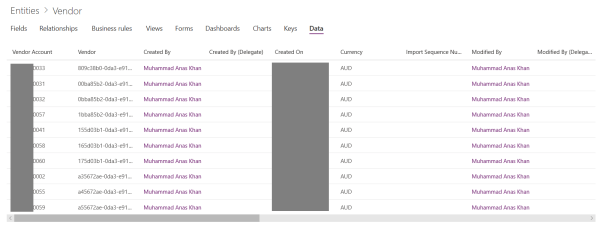
Product: Dynamics 365 for Finance and OperationsCommon Data Service Purpose: The purpose of this blog is to demonstrate how we can integrate Dynamics 365 for Finance and Operations with Common Data Service (CDS). Prerequisites: Basic understanding of Common Data Service and PowerApps Admin Center Steps: Create a new custom entity for Vendor and add relevant... Continue Reading →
D365FO: The path is already mapped in workspace

Product: Dynamics 365 for Finance and Operations Purpose: The purpose of this blog is to explain how can we resolve the version control workspace issue while working with Azure DevOps version control, previously known as VSTS or TFS. Error: The path % is already mapped in workspace % Resolution: First make sure that no other... Continue Reading →
AX 2012: Existing DIXF service for new AOS instance
Product: Dynamics AX 2012 Purpose: The purpose of this document is to explain what we can do to reuse a DIXF service of an existing AOS instance for a new AOS instance Steps: Copy paste the following files from the bin folder of an existing AOS instance to the bin folder of the new AOS... Continue Reading →
D365FO: Data entity filter on enum field

To filter data entity using an enum field, we need to use a specific query expression syntax. For example, to filter Purchase order header data entity, PurchaseOrderHeadersV2, to get only 'Confirmed' purchase orders, we can add filter to DocumentApprovalStatus entity field which sources its value from VersioningDocumentState enum like below: https://usnconeboxax1aos.cloud.onebox.dynamics.com/data/PurchaseOrderHeadersV2?$filter=DocumentApprovalStatus eq Microsoft.Dynamics.DataEntities.VersioningDocumentState'Confirmed' As you... Continue Reading →
AX 2012: Create SSRS Line Chart Report
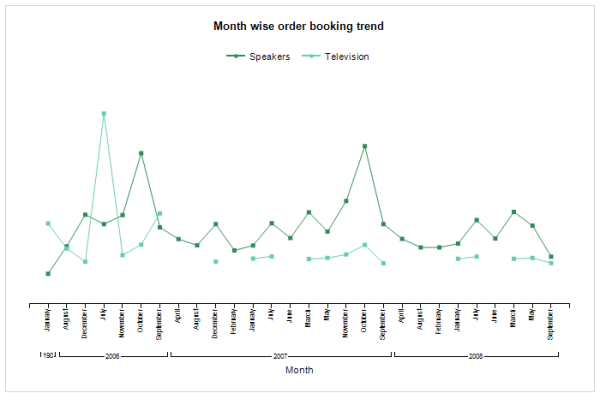
Purpose: The purpose of this document is to demonstrate how we can leverage the power of business intelligence through a simple SSRS line chart report. Prerequisites: Visual Studio 2013 Visual Studio 2013 tools. Reporting extension. Report Builder. Should be well-versed in Report Programming Model. Business requirement: Leverage business intelligence by analyzing sales trends for top item groups... Continue Reading →
AX 2012: Understanding postal addresses data model

Purpose: The purpose of this document is to quickly understand the underlying data model which is used by Dynamics AX to store postal addresses for a party. Some examples of party are customer, vendor and company. Assumptions: Basic understanding of UML's crow foot notation for data modeling. Data model:
 D365 for Finance and Operations