Purpose: The purpose of this blog post is to share handy queries for addresses and contact information with the community Get site from contact information recordGet site from address recordGet warehouse from contact information recordGet warehouse from address recordGet customer from contact information recordGet customer from address recordGet vendor from contact information recordGet vendor from... Continue Reading →
Write TSV file in X++
Purpose: The purpose of this blog post is to demonstrate how can we write a tsv (tab delimited) file in X++ The code actually exports system database log to a TSV fileUses standard SysDatabaseLogReport queryAdds a range for Warehouse tableUses formatted datetime string for filename Product: Dynamics AX 2012 Code: Class declaration. class MAKSysDatabaseLogService {... Continue Reading →
Get path for menu item in X++
Purpose: This post describes how we can get the full menu path of a given menu item. Product: Dynamics AX 2012 Code: static void MAKMenuItemPath(Args _args) { #TreeNodeSysNodeType #Properties #AOT TreeNode menuItemNode = TreeNode::findNode(@"\Menu Items\Display\HRMParameters"); TreeNode menuNode; xRefPaths xRefPaths; xRefReferences xRefReferences; TreeNode parentNode; str path; xRefPaths = xRefPaths::find(menuItemNode.treeNodePath()); while select xRefReferences where xRefReferences.referencePathRecId == xRefPaths.RecId... Continue Reading →
Read CSV file in X++
Purpose: The purpose of this blog post is to demonstrate how to read a csv file in X++ Product: Dynamics AX 2012 Code: static void MAKReadFile(Args _args) { #File IO io; CustAccount custAccount; Email email; FilenameOpen filename = @"C:\Temp\CustomerContactInfo.csv"; Container record; ; io = new CommaTextIo(filename, #IO_Read); if (!io || io.status() != IO_Status::Ok) { throw... Continue Reading →
Create contact information in X++
Purpose: The purpose of this blog post is to demonstrate how to create contact information in X++ Product: Dynamics AX 2012 Description: The code create contact information with purpose "Collection" on the customer record. Code: static void MAKCustContactCreate(Args _args) { #define.LocationRoleName('Collection') CustTable custTable; DirPartyTable dirPartyTable; LogisticsElectronicAddress logisticsElectronicAddress; LogisticsLocationRole locationRole; Map locationRoleMap; container locationRoleCon; ; custTable... Continue Reading →
Create print management settings in X++
Purpose: The purpose of this blog post is to demonstrate how can we create print management settings in X++ Product: Dynamics AX 2012 Description: The code creates a print management settings record on a customer for collection letter note document and uses first contact of type email and purpose "Collection" found on the customer record... Continue Reading →
AX 2012: Existing DIXF service for new AOS instance
Product: Dynamics AX 2012 Purpose: The purpose of this document is to explain what we can do to reuse a DIXF service of an existing AOS instance for a new AOS instance Steps: Copy paste the following files from the bin folder of an existing AOS instance to the bin folder of the new AOS... Continue Reading →
AX 2012: Create SSRS Line Chart Report
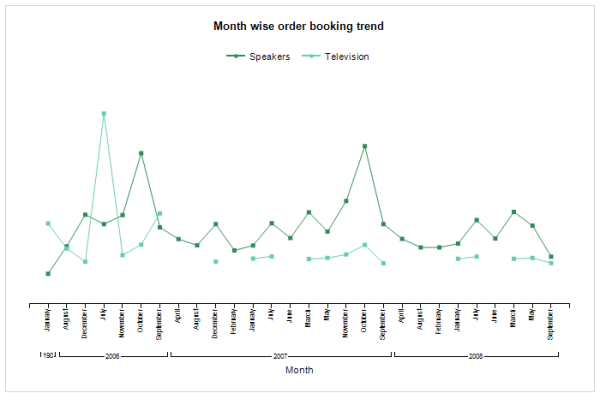
Purpose: The purpose of this document is to demonstrate how we can leverage the power of business intelligence through a simple SSRS line chart report. Prerequisites: Visual Studio 2013 Visual Studio 2013 tools. Reporting extension. Report Builder. Should be well-versed in Report Programming Model. Business requirement: Leverage business intelligence by analyzing sales trends for top item groups... Continue Reading →
AX 2012: Understanding postal addresses data model

Purpose: The purpose of this document is to quickly understand the underlying data model which is used by Dynamics AX to store postal addresses for a party. Some examples of party are customer, vendor and company. Assumptions: Basic understanding of UML's crow foot notation for data modeling. Data model:
AX 2012: Automated build deployment process

Purpose: The purpose of this document is to describe how we can deploy automated builds to different Dynamics AX pre-production environments so that newly developed features could be rolled-out for UAT. The document also illustrates how version controlling by TFS and data migration activities fit into the big picture. Business requirement: Ability to release, deploy automated builds... Continue Reading →
 D365 for Finance and Operations