Purpose: The purpose of this blog post is to share handy queries for addresses and contact information with the community Get site from contact information recordGet site from address recordGet warehouse from contact information recordGet warehouse from address recordGet customer from contact information recordGet customer from address recordGet vendor from contact information recordGet vendor from... Continue Reading →
Get path for menu item in X++
Purpose: This post describes how we can get the full menu path of a given menu item. Product: Dynamics AX 2012 Code: static void MAKMenuItemPath(Args _args) { #TreeNodeSysNodeType #Properties #AOT TreeNode menuItemNode = TreeNode::findNode(@"\Menu Items\Display\HRMParameters"); TreeNode menuNode; xRefPaths xRefPaths; xRefReferences xRefReferences; TreeNode parentNode; str path; xRefPaths = xRefPaths::find(menuItemNode.treeNodePath()); while select xRefReferences where xRefReferences.referencePathRecId == xRefPaths.RecId... Continue Reading →
Generate financial report in X++
Purpose The purpose of this blog post is to demonstrate how can we generate a financial report in X++ and download it as a file. Product Dynamics 365 Finance. Description Please find the code snippet below which can be used to generate a financial report in X++. The code generates the report in XML format.... Continue Reading →
D365: Send email in X++ using email templates

Product: Dynamics 365 for Finance and Operations Purpose: The purpose of this document is to demonstrate how we can send emails in X++ using built-in email templates. For demonstration purposes we'll be using standard email template CnfmOrder. This email template is used to send email to customer when a sales order is confirmed. Business requirement:... Continue Reading →
D365: Create lookup in X++
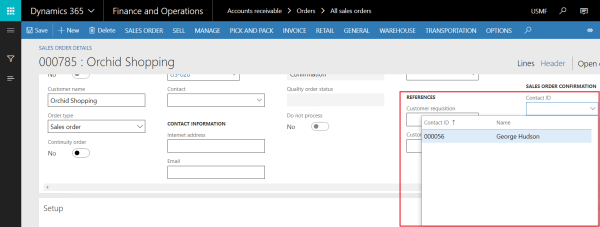
Product: Dynamics 365 for Finance and Operations Purpose: The purpose of this document is to demonstrate how we can create a lookup in X++ and attach it to an extension field added to the form extension of standard Sales order form. This is a good example to see how we can use event handling to... Continue Reading →
D365: Reverse customer transaction in X++
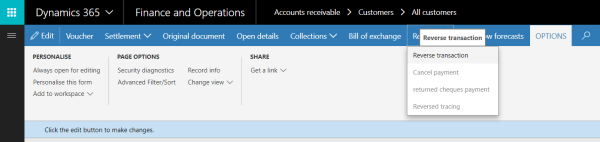
Purpose: The purpose of this document is to demonstrate how we can reverse a posted customer transaction through X++. The code below can be used as a script to automate reversal of posted customer transactions. Product: Dynamics 365 for Finance and Operations Development: Please find below the code which can be used to reverse a... Continue Reading →
AX 2012: General journal posting in X++

The purpose of this document is to describe how we can quickly post general journals (also known as GL opening balances or simply GL balances) across all the companies in X++.
AX 2012: Sales Order Posting Custom Validations

It is often a customer requirement to check for custom validations before posting a Sales Order. The best place to put your code for custom validations can be found below: Validations for Sales Table: AOT > Classes > SalesFormLetterProvider > checkHeading() For example, To check for custom field SalesTable.MAKBlocked, this is how custom validation should be added in... Continue Reading →
AX 2012: Using Temporary Table as Form’s Datasource
First add a method on the form to populate records in the temporary table: public LabelsTable populateRecords() { SysDictTable dictTable = new SysDictTable(tableNum(PurchLine)); SysDictField dictField; TreeNode treeNode; LabelsTable labelsTableLocal; // Temporary table (InMemory) FieldId fieldId = dictTable.fieldNext(0); while (fieldId) { dictField = dictTable.fieldObject(fieldId); if (dictField.isSql() && !dictField.isSystem() && dictField.name() != "Modified") { treeNode = dictField.treeNode();... Continue Reading →
AX 2012: Loop through all the fields of a table in X++
This is how we can loop through all the fields of a table in X++: static void Job1(Args _args) { SysDictTable dictTable = new SysDictTable(tableNum(PurchLine)); SysDictField dictField; TreeNode treeNode; FieldId fieldId = dictTable.fieldNext(0); while (fieldId) { dictField = dictTable.fieldObject(fieldId); if (dictField.isSql() && !dictField.isSystem()) { treeNode = dictField.treeNode(); info(strFmt("%1 | %2 | %3", dictField.name(), // Field... Continue Reading →
 D365 for Finance and Operations